February 22, 2015
Super Quiz is an excellent Google Sheets add-on that allows teachers to add some amazing functionalities to the quizzes they create through Google Forms. For instance, when you create a quiz, you only need to complete it once with an answer key and all future submissions will be automatically graded according to the answers you provided. Another important feature of Super Quiz is that it enables you to get a break down of class understanding and a list of incorrect students' answers for each question in case you want to stage an intervention.
Also, �By filling out a few cells of information, you can also generate personalized differentiated written feedback emailed to students as soon as they submit a response. No need to monitor and �re-grade� - just set-up and go!You can split your quiz in up to 4 different topics, and provide specific feedback on each. If you don�t want to email students, you can choose to print feedback on a 2x2 array, too.�
Watch the video below to learn more about Super Quiz
Showing posts with label quiz tools. Show all posts
Sunday, February 22, 2015
Sunday, January 11, 2015
FlipQuiz- A Good Tool to Create Gameshow-style Quizzes in Class
January 12, 2015
A few days ago I shared here a visual guide on how to create a quiz show on Google Drive and today I am introducing you to another tool that does almost the same. FlipQuiz is a web tool that allows teachers to easily create gameshow-style boards for test reviews in the classroom. All the boards you create can be saved for later use. You can also share your boards up on-screen and have students work on them collaboratively. Watch this demo to show you what a gameshow-style board looks like.
To set up your new quiz board, you will need to register. Once logged in, click on � Create a new board�. Then use the editor provided there together with the different tools it offers to design your game boards. You can always edit your boards by clicking on the �edit your entire board button�. When you are done creating your quiz boards, you can then see the presentation version of your board by hitting �Launch presentation view�.
Some of the features of FlipQuiz include:
A few days ago I shared here a visual guide on how to create a quiz show on Google Drive and today I am introducing you to another tool that does almost the same. FlipQuiz is a web tool that allows teachers to easily create gameshow-style boards for test reviews in the classroom. All the boards you create can be saved for later use. You can also share your boards up on-screen and have students work on them collaboratively. Watch this demo to show you what a gameshow-style board looks like.
To set up your new quiz board, you will need to register. Once logged in, click on � Create a new board�. Then use the editor provided there together with the different tools it offers to design your game boards. You can always edit your boards by clicking on the �edit your entire board button�. When you are done creating your quiz boards, you can then see the presentation version of your board by hitting �Launch presentation view�.
Some of the features of FlipQuiz include:
- Create and save boards in your account for future use
- FlipQuiz� allows you the freedom to create beautiful game boards that you can take with you from class to class, school to school, and at home.
- FlipQuiz� has created a beautiful game board that will grasp the attention of all students.
- Not only can you add your questions to each of your game boards, but you can also add the answers if you so desire. This allows you to be virtually hands-free as you walk around the classroom hosting the game.
Friday, January 2, 2015
Teachers Easy Guide to Creating Quiz Shows on Google Drive
January 3, 2015
Flippity is a powerful web tool that you can use with Google Spreadsheets to perform a variety of tasks. In the last post we published here we talked about how to use Flippity to create Flashcards and we visually demonstrated how teachers can go about creating their own flashcards using this tool. Today, we are sharing with you another great functionality provided by Flippity. This time you will get to learn how to use Flippity to create a Quiz Show from a Google Spreadsheet. Click here to see a demo.
Here is how you can make your own Quiz Show using Flippity on Google Spreadsheets:
1- 1- Click on this template and copy it to your Google Spreadsheet by clicking on "file" and " make a copy"
2- Now that you are on the copied version of that template, edit the text and type in the data you want to include in your Quiz Show.
3-Publish your sheet by clicking on "file " then "publish"
4-Copy the link under the link tab
5- Now click on the "get the link here" tab of your template which is at the bottom
6- Paste that link in the light blue cell to get the link to your Flippity Quiz Show
Thanks to this Weebly page where I learned about Flippity.
Follow us on : Twitter, Facebook , Google plus, Pinterest .
Flippity is a powerful web tool that you can use with Google Spreadsheets to perform a variety of tasks. In the last post we published here we talked about how to use Flippity to create Flashcards and we visually demonstrated how teachers can go about creating their own flashcards using this tool. Today, we are sharing with you another great functionality provided by Flippity. This time you will get to learn how to use Flippity to create a Quiz Show from a Google Spreadsheet. Click here to see a demo.
Here is how you can make your own Quiz Show using Flippity on Google Spreadsheets:
1- 1- Click on this template and copy it to your Google Spreadsheet by clicking on "file" and " make a copy"
2- Now that you are on the copied version of that template, edit the text and type in the data you want to include in your Quiz Show.
3-Publish your sheet by clicking on "file " then "publish"
4-Copy the link under the link tab
5- Now click on the "get the link here" tab of your template which is at the bottom
6- Paste that link in the light blue cell to get the link to your Flippity Quiz Show
Thanks to this Weebly page where I learned about Flippity.
Follow us on : Twitter, Facebook , Google plus, Pinterest .
Wednesday, December 24, 2014
Here Is How to Create Digital Quizzes and Surveys Using Kahoot
December 24, 2014
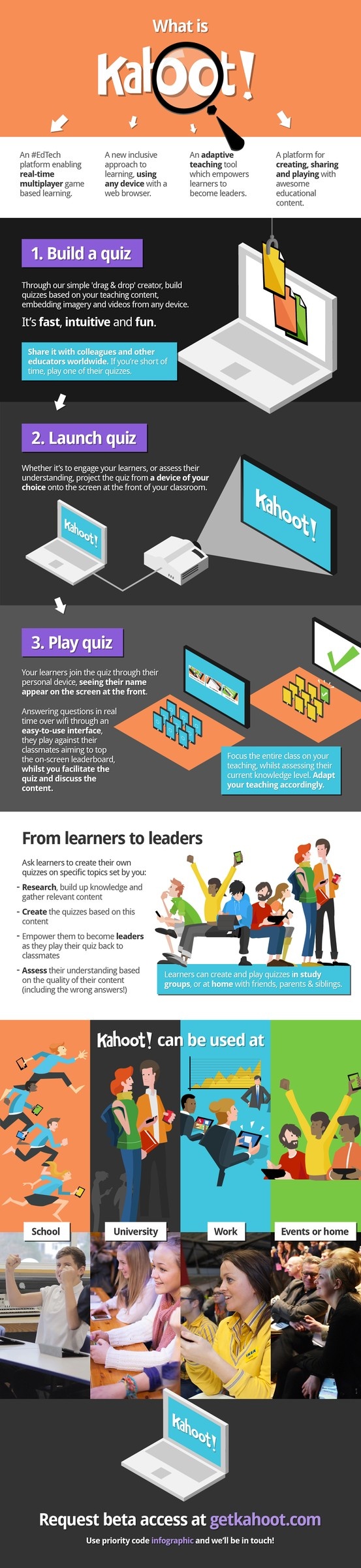
Kahoot is another great student response system that teachers can use to create and deliver quizzes and surveys to students. Kahoot provides a learning environment that is ideal for engaging students for it incorporates the precepts of both game-based learning and inquiry-based learning. Kahoot allows teachers to create quizzes and surreys that include a wide variety of multimedia elements such as videos, pictures and text. Each quiz you create can be accessed by students across different devices . Also, teachers have the possibility to create time-controlled quizzes. You can set a specific period of time for the answer of each question. In this way students are rewarded not only for the correct answer but also for their timeliness.
Below is a very good visual illustrating how Kahoot works.
Kahoot is another great student response system that teachers can use to create and deliver quizzes and surveys to students. Kahoot provides a learning environment that is ideal for engaging students for it incorporates the precepts of both game-based learning and inquiry-based learning. Kahoot allows teachers to create quizzes and surreys that include a wide variety of multimedia elements such as videos, pictures and text. Each quiz you create can be accessed by students across different devices . Also, teachers have the possibility to create time-controlled quizzes. You can set a specific period of time for the answer of each question. In this way students are rewarded not only for the correct answer but also for their timeliness.
Below is a very good visual illustrating how Kahoot works.
Wednesday, November 5, 2014
Over 40 Web Tools to Create Quizzes and Polls in Class
November, 2014
Today as I was browsing through my Google Plus feeds I came across this excellent list created by classroom aid. The list features a plethora of useful web tools that teachers can use in the classroom to create quizzes and run polls. Several of the tools mentioned in this list have already been featured in this blog in the past but some are new to us. I invite you to have a look and share with us what you think of them.
Follow us on : Twitter, Facebook , Google plus, Pinterest .
Today as I was browsing through my Google Plus feeds I came across this excellent list created by classroom aid. The list features a plethora of useful web tools that teachers can use in the classroom to create quizzes and run polls. Several of the tools mentioned in this list have already been featured in this blog in the past but some are new to us. I invite you to have a look and share with us what you think of them.
Follow us on : Twitter, Facebook , Google plus, Pinterest .
Subscribe to:
Posts (Atom)