Showing posts with label iPad apps to showcase students learning. Show all posts

Tuesday, February 10, 2015

Excellent Qualitative Formative Assessment Toolkit for Teachers

February 10, 2015
I just came across this timely poster shared on a Google Plus post by Mickey McFetridge. This visual, titled Qualitative Formative Assessment Toolkit, features four practical ways to document learning using mobile technology. Two days ago I shared here a list of some of the best iPad apps to help students document and show their learning and this poster  clicks in perfectly with that post.

What I liked the most about this poster is the last line in it which reads �the process is the product�. This statement sums up the essence of using technology in learning. The emphasis should be placed on the process, the procedures and the ways students use technology in their learning. Any preoccupation with the product per se can not see the forest for the trees. As I was reading through this poster I thought of some good iPad apps to add to this work in order to provide students with more options to choose from when documenting their learning. Here are some of them :

iPad apps for creating Screencasts:
iPad apps for filming videos
iPad apps for taking screenshots
iPad apps for making photos:
Qualitative Formative Assessment Toolkit is a work realized by Reshan Richards ( co-creator of Explain Everything app). Richards published a post on Education Week in which he explained in details the workings of this toolkit.
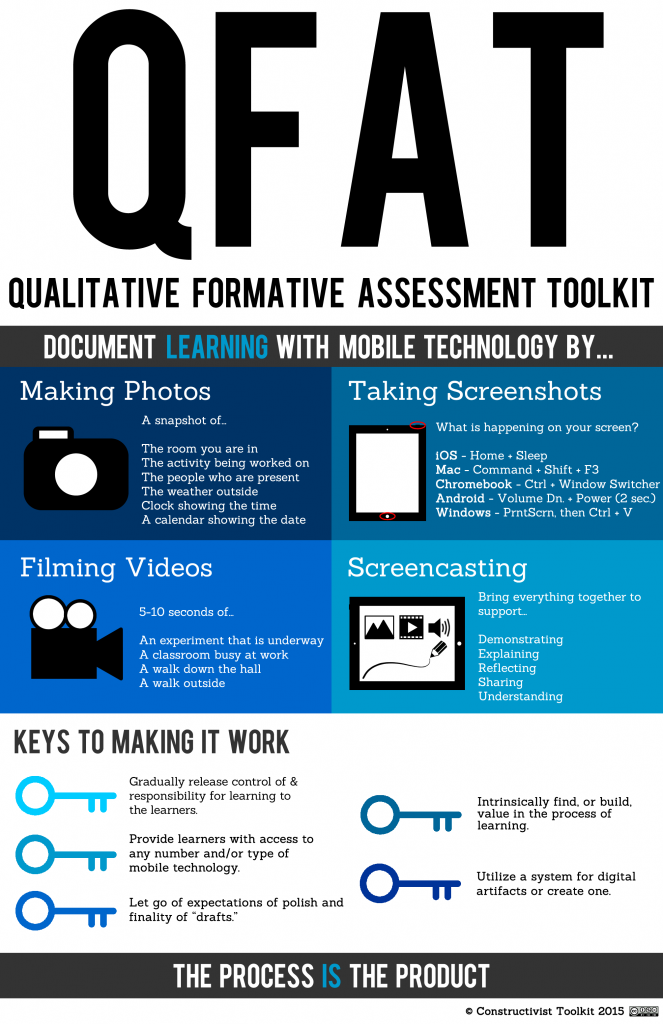


Qualitative Formative Assessment Toolkit

Sunday, February 8, 2015

3 Apps Students Can Use to Document and Show Their Learning

February 8, 2015
There are several ways students can display and document their learning from creating digital portfolios to posting in a blog or a wiki. Creating digital mashups is also another potent strategy to use in this regard. The strength of this practice, besides enabling students to capture and document their learning processes, is the fact that it initiates them into the world of multimodality and allows them to express their voices through different modes.

Below are some of the iPad apps I would recommend for this purpose.

1- Seesaw

�Seesaw empowers students to document and share what they are learning in class.Students (as young as 5!) can independently create, capture, and store artifacts of learning in their private learning journal.Parents (after teacher approval) get notified of new items, giving them a glimpse of their child�s day and an opportunity to support learning at home.�

2- Educreations 


Students can use Educreations app to create animated videos explaining the things they have learned.�Educreations is a unique interactive whiteboard and screencasting tool that's simple, powerful, and fun to use. Annotate, animate, and narrate nearly any type of content as you explain any concept. Teachers can create short instructional videos and share them instantly with students, or ask students to show what they know and help friends learn something new.�

3- Explain Everything


This is another powerful app for documenting learning. Explain Everything allows students to create screencasts and step-by-step guides. They can annotate, animate, narrate import and export a wide variety of multimedia materials.Students can �Create slides, draw in any color, add shapes, add text, and use a laser pointer. Rotate, move, scale, copy, paste, clone, and lock any object added to the stage.�